
Boostorder Cloud
I cannot login, the password is not correct
-
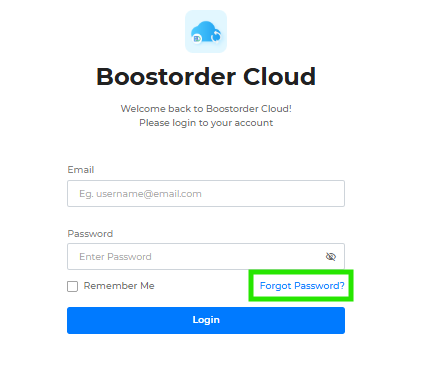
In the login page, tap on Forgot Password
-
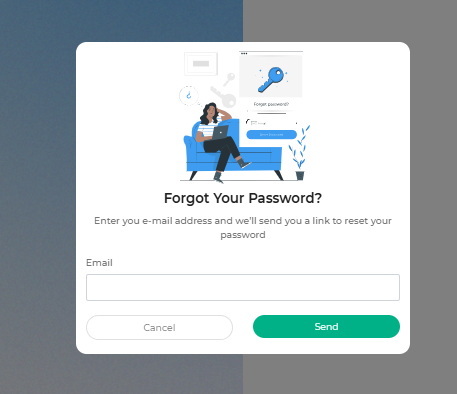
Enter the correct email
-
An reset password email is sent
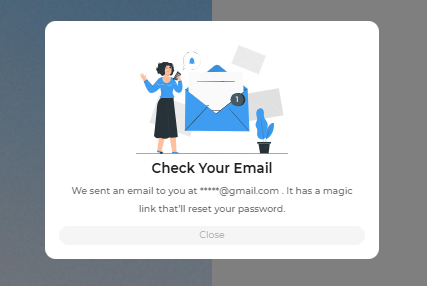
- Create a new password.
- If no email is sent to the email, please check the spam and trash folders for the email.
I will travel overseas, please help to unblock IP so that we can place order
User is able to place order regardless of Boostorder Rep V3 version when travelling overseas.
If you encounter any issue when placing order, take a screenshot from this website https://whatismyipaddress.com/ immediately and reach out to customer support
Boostorder Rep V3
The app keeps loading when I open it
If the app is stuck on the loading screen, try the following steps in order:
-
Reinstall the app.
-
Go to your device settings and clear the app data.
If the issue still persists after completing all steps, contact customer support.
Why can’t I print the order from the app?
Please check the following:
-
Ensure Bluetooth permission is enabled for the app.
-
Ensure the printer is powered on.
-
Restart the printer.
-
Disable and re-enable Bluetooth on your device.
If printing still fails after completing all steps, contact customer support immediately.
Why is the printer not turning on when I press the power button?
-
Charge the printer fully.
If the printer still does not turn on or shows no indication of power after charging, contact customer support immediately.
The app is very laggy during usage
This issue is not the same with app keeps loading issue. If the app frequently feels laggy, check the following:
-
Open the app.
-
Check the Downloading module to see whether data is currently being downloaded in the background.
-
If downloading is in progress, wait until the download is completed. App performance should return to normal afterward.
-
If no downloading is happening, remove the app in the background and open the app again
- If the issue still persists, it may be caused by settings
In this case, contact customer support for further investigation and assistance.
Why I cannot get the OTP when I sign in?
-
Press on 'Resend' button to receive the OTP again
If user still cannot receive the OTP, immediately contact customer support for further assistance